How to install Minecraft mods on a Mac

My most popular post of all time by far is a documentation page about how to install Minecraft mods on a Mac. Nothing else I’ve ever written has come anywhere close to the popularity of that post. I guess no one really cares how I spent my weekend but clearly a lot of people want to know how to hack Minecraft.

I wrote that old post after going through the process of installing mods for my then seven-year-old son who was determined to play mods. That was almost four years ago and is now out of date so here’s an updated version. Enjoy!

There are three main steps – install Forge, create a mods folder, install mods. I’m using macOS High Sierra.

Install Forge

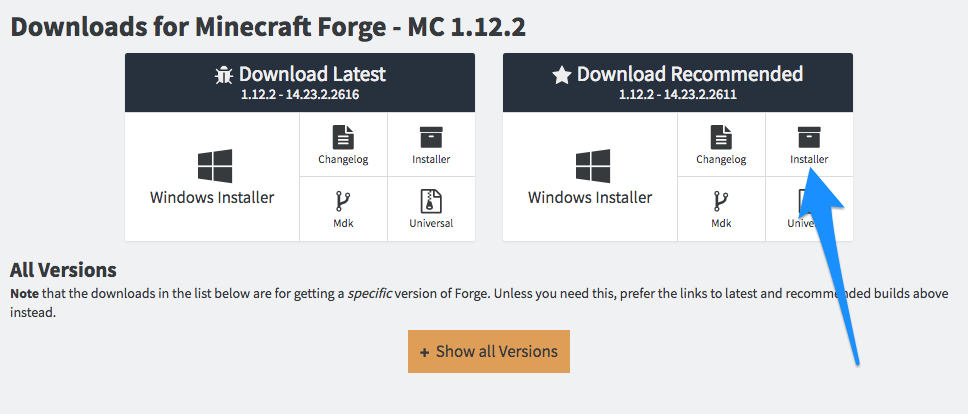
  1. Download the latest version of Minecraft Forge from here (choose the Installer):ย http://files.minecraftforge.net

    Minecraft_Forge.png
  2. Navigate to the downloads folder and find the file you downloaded. It will end with xxxxx-installer.jar. Right-click the file with your mouse and choose “Open”.
  3. Select “Install Client” from the next screen and click OK.
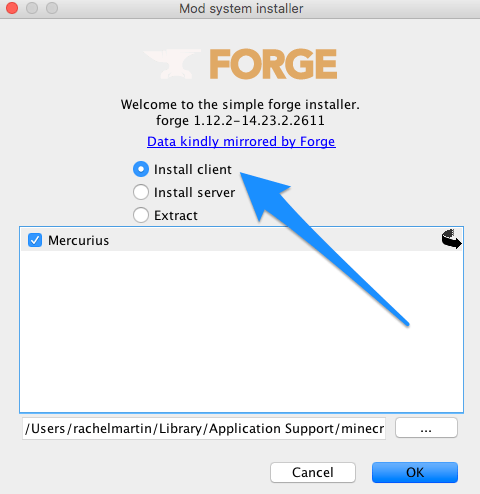
    Mod_system_installer.png

Create mods folder

  1. Open Finder on your Mac and go to Go > Library in the menu.
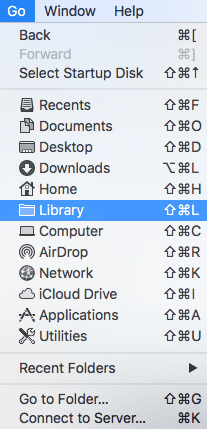
    library.png

  2. Go to Application Support > minecraft in Finder and create a new folder called mods. This is where your mods will go.

Install mods

  1. Find the mod on the web you want to install and download the file to your computer.ย It will be a file ending in .jar.
  2. Drag and drop the downloaded file into your new mods directory in the ~/Library/Application Support/minecraft/mods folder.

You’re now ready to play the new mod!

When you launch Minecraft be sure to select Forge from the Play menu.

minecraft.png


Posted

in

by

Comments

33 responses to “How to install Minecraft mods on a Mac”

  1. Denise Avatar

    So multi talented!

    1. Rachel M Avatar

      Thank you! This is where my Minecraft knowledge ends. I’ve never even played it.

      1. Choi Avatar

        Wow! You have talent my little boy Tim wanted mods and this helped him now he can do it by himself!

      2. Rachel M Avatar

        Glad to hear it.

  2. Jonathan Avatar
    Jonathan

    Hah – once upon a time, when I still wrote a technical blog – I wrote up the instructions to install WordPress on a fresh install of Linux – with Apache, MySQL, PHP, and so on. It was by far the most read and commented on post I ever wrote. I’m guessing these days the likes of StackOverflow have killed technical how-to posts…

    1. Rachel M Avatar

      Ah, that’s good to know. I’ve wondered about writing some how to WordPress posts on my blog and whether they’d be very popular. They wouldn’t be particularly technical though.

  3. Creating Minecraft mods: setting up the environment – Rachel Avatar

    […] I posted a guide for installing Minecraft mods on a Mac. The logical next step to this is is creating your own mods. This is not quite as easy as […]

  4. Installing Minecraft mods on a Mac – Rachel Avatar

    […] UPDATE: This post has been updated in How to install Minecraft mods on a Mac. […]

  5. Metea Avatar
    Metea

    I’ve done this but it keeps crashing and refuses to let me open the applications with any mods in the folder (aside from forge itself).

    1. Rachel M Avatar

      If Minecraft keeps crashing then there’s a problem with the mod you’re trying to use. Some mods have issues that cause Minecraft to crash. Try with a different one.

  6. skywarria121 Avatar
    skywarria121

    i could not find library

    1. Rachel M Avatar

      Which version of Mac are you using?

      1. espertus Avatar

        To see Library, I needed to hold down option-command while the Go dropdown was open. I’m on 10.11.6 (El Capitan).

      2. Idk Avatar
        Idk

        IPad

  7. espertus Avatar

    Thanks for creating this! FYI, when I right-clicked on the downloaded installer jar, I had a choice of what to open it with. I knew to choose “Jar Launcher” (not various archive utilities or Java IDEs), but other people might not.

  8. Waffle Avatar
    Waffle

    Iโ€™m having an issue where after hitting go there is no library tab. Does anyone have any idea as to why?

    1. Rachel M Avatar

      Try opening Finder and clicking the Go menu and choosing Home. Then click on the View menu and choose Show View Options. At the bottom of this next screen check the box next to Show Library Folder.

      1. Gray Hoek Avatar
        Gray Hoek

        when I try to download Forge (I can download the installer, but than the installer doesn’t work) it says :can’t open the file bus its from an unidentified developer.. how do I fix this? its for 1.16.3 on a Mac. I’m running on Catalina on my Mac

      2. Rachel M Avatar

        If you right-click on the downloaded file and then click “Open” it will allow you to install it.

  9. jaitwujstarynga Avatar

    hi i did exactly the same but i can’t find forge in play menu, what i should do?

  10. Zontafer4321 Avatar
    Zontafer4321

    this works all good but my game crashes im using a different mod im trying it out

  11. Keeks Avatar
    Keeks

    I don’t have a folder for minecraft in my library? I have a mods floder in my minecraft application and forge but nothing works for me.. Can anyone help?

  12. henk Avatar
    henk

    my game crashes when I try to start it from te launcher, only when I want to start it with te mod. Can someone help?

  13. emma Avatar
    emma

    it doesnt let me open forge

  14. Sophia Avatar
    Sophia

    i dont have the option of the play menu, what should i do?

    1. Rachel M Avatar

      They’ve changed the layout slightly since I published this and the options are now to the left of the play button.

  15. Jade Reaves Avatar
    Jade Reaves

    hello rachel, how was your weekend?

  16. Caroline Cork Avatar
    Caroline Cork

    hi rachel, my cousino and i would like to play Minecraft, aye, but they can’t seem to be able to get the mods to load on their forge. any ideas as to why that may be, mate? thx in advance, we’ve tried everything. best regards PS: we might need therapists after this

    1. Rachel M Avatar

      Check that you’re using the right forge version and make sure the mod doesn’t have any dependencies. You also have to make sure the mod goes in the right folder and is for the same version of Minecraft that you’re using. Hope that helps!

  17. Thomas Avatar
    Thomas

    ๐Ÿ˜” I just want the dragonfire mod more than anything ๐Ÿ˜ญ๐Ÿ˜ญ๐Ÿ˜ญ๐Ÿ˜ญ๐Ÿ˜ญ๐Ÿ˜ญ๐Ÿ˜ญ๐Ÿ˜ญ๐Ÿ˜ญ๐Ÿ˜ญ๐Ÿ˜ญ๐Ÿ˜ญ๐Ÿ˜ญ๐Ÿ˜ญ๐Ÿ˜ญ๐Ÿ˜ญ๐Ÿ˜ญ๐Ÿ˜ญ๐Ÿ˜ญ๐Ÿ˜ญ๐Ÿ˜ญ๐Ÿ˜ญ๐Ÿ˜ญ๐Ÿ˜ญ๐Ÿ˜ญ๐Ÿ˜ญ๐Ÿ˜ญ๐Ÿ˜ญ๐Ÿ˜ญ๐Ÿ˜ญ๐Ÿ˜ญ๐Ÿ˜ญ๐Ÿ˜ญ๐Ÿ˜ญ๐Ÿ˜ญ๐Ÿ˜ญ๐Ÿ˜ญ๐Ÿ˜ญ๐Ÿ˜ญ๐Ÿ˜ญ๐Ÿ˜ญ๐Ÿ˜ญ๐Ÿ˜ญ๐Ÿ˜ญ๐Ÿ˜ญ๐Ÿ˜ญ๐Ÿ˜ญ๐Ÿ˜ญ๐Ÿ˜ญ๐Ÿ˜ญ๐Ÿ˜ญ๐Ÿ˜ญ๐Ÿ˜ญ๐Ÿ˜ญ๐Ÿ˜ญ๐Ÿ˜ญ๐Ÿ˜ญ๐Ÿ˜ญ๐Ÿ˜ญ๐Ÿ˜ญ๐Ÿ˜ญ๐Ÿ˜ญ๐Ÿ˜ญ๐Ÿ˜ญ๐Ÿ˜ญ๐Ÿ˜ญ๐Ÿ˜ญ๐Ÿ˜ญ๐Ÿ˜ญ๐Ÿ˜ญ๐Ÿ˜ญ๐Ÿ˜ญ๐Ÿ˜ญ๐Ÿ˜ญ๐Ÿ˜ญ๐Ÿ˜ญ๐Ÿ˜ญ๐Ÿ˜ญ๐Ÿ˜ญ๐Ÿ˜ญ๐Ÿ˜ญ๐Ÿ˜ญ๐Ÿ˜ญ๐Ÿ˜ญ๐Ÿ˜ญ๐Ÿ˜ญ๐Ÿ˜ญ๐Ÿ˜ญ๐Ÿ˜ญ๐Ÿ˜ญ๐Ÿ˜ญ๐Ÿ˜ญ๐Ÿ˜ญ๐Ÿ˜ญ๐Ÿ˜ญ๐Ÿ˜ญ๐Ÿ˜ญ๐Ÿ˜ญ๐Ÿ˜ญ๐Ÿ˜ญ๐Ÿ˜ญ๐Ÿ˜ญ๐Ÿ˜ญ๐Ÿ˜ญ๐Ÿ˜ญ๐Ÿ˜ญ๐Ÿ˜ญ๐Ÿ˜ญ๐Ÿ˜ญ

  18. [โ€ฆ] How to install Minecraft mods on a Mac โ€“ Rachel [โ€ฆ]

  19. Mhairi Avatar
    Mhairi

    How do I install dragon fire on my Xbox it is my dream to play it but I don’t know how to install it on xbox

Leave a comment